In / Out Variables
Documentation for In / Out Variables.
In and Out variables are a way to pass config or input data into the pattern and read result data back out from the pattern.
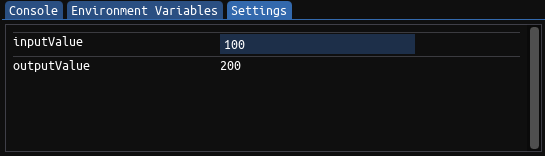
Each in and out variable creates an entry in the Settings tab of the Pattern Editor view. in variables create an input field, out variables create a label.
Before executing the pattern, the user can now enter a value in the input field of the in variable. This value will be copied into the corresponding in variable before the pattern is executed.
Likewise, once the pattern has finished executing, whatever value has been written to the out variable will be displayed in the label.
The following code shows a simple pattern that reads in the value of inputValue, multiplies it by two and then writes it back into outputValue.
u32 inputValue in;
u32 outputValue out;

fn main() {
    outputValue = inputValue * 2;
};